Ad-hoc subscriptions
Setting up regular recurring products on Subbly
Our product builder is super flexible tool which (we believe) caters towards all possible business setups. One modification and usual business setup would be something that we like to call an adhoc subscription. See below how to set it up on Subbly
What is an ad-hoc billing?
If you don't have any specific renewal dates which are set to specific days of the week/month/year, and you're handling your subscriptions as they come, than your product setup is what we like to call adhoc.
How to setup this on Subbly?
Easy!
You can see an example of an adhoc setup (most frequently we're getting merchants setting monthly adhoc subscription plans) down below:
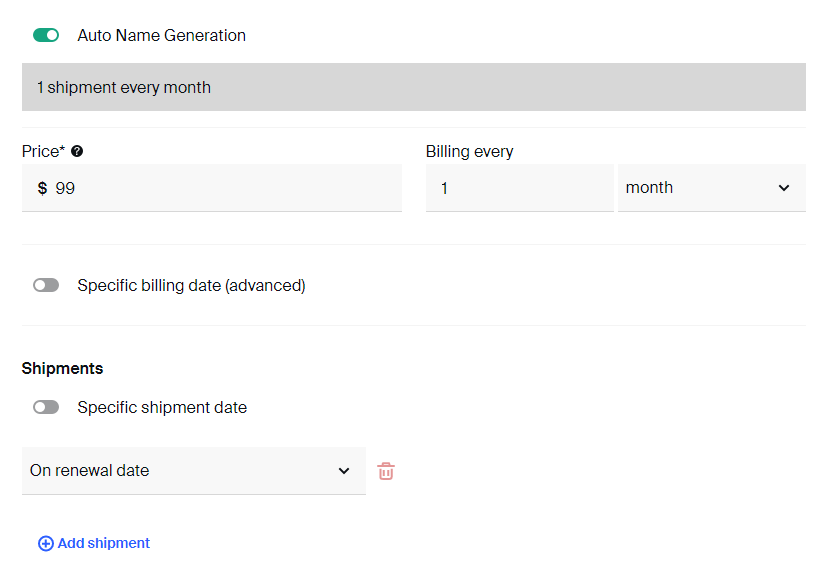
If you wouldn't want the shipping date for this product to be the same as the actual renewal date, you can feel free to choose how many days/weeks/months after the actual renewal will shipping be created, so feel free to set the shipping date appropriately.
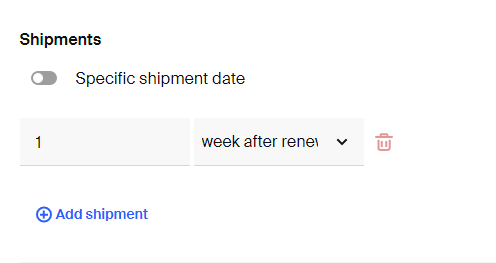
Similarly, you can build lots of different adhoc subscriptions.
Video tutorial
If you're more convenient with the nice little video tutorial, please check one below:
How to build adhoc subscriptions with set shipping date?
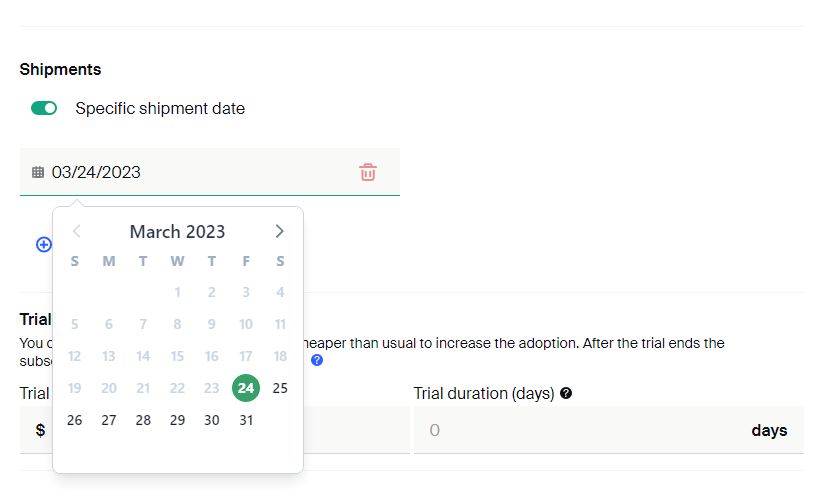
We've recently introduced a new improvement to the way the adhoc subscription setup works. This is useful for merchants in order to consolidate all their shipping requirements under a single date.
Previously, shipping was determined by the date the customer subscribed to so it would unnecessarily create a lot more work or force merchants to manually change the billing dates. But with this new update no matter when your customers sign up, their shipment can be scheduled for the specific date you set for every cycle.
You can enable this by toggling the "Specific shipment date" option in the product setup options as shown below:
If you have any more questions on setting this up, be sure to contact the support team for further assistance.
How did we do?
What are subscriptions?
Anchored subscriptions