Account & Billing
Can I switch between pricing plans? (on Subbly)
Setting up Stripe
Setting up PayPal
Setting up Braintree (or PayPal through Braintree)
Setting up Auth.net
Setting up Apple Pay & Google Pay?
Setting up a specific billing time
How to connect a domain to your website?
Handling invoices
How do I set the currency for my store?
Country of trade setting
Timezone setup
Taxes
How do I export taxes on Subbly?
Can I grant access to more users to my account? (Teams app)
Can I manage the email notifications I receive?
How do I put my Subbly store and website offline?
How do I cancel my trial?
How do I cancel my account?
Preventing Customer's Cancellations
Checkout & Payments
Setting up the checkouts and customer portal on custom domain
Testing checkouts and customer portal
Setting up your branding
How do I remove Subbly branding from the checkout?
How to translate the checkout and the customer portal?
How do I add Terms & Conditions to the checkout?
Do my customers need to register to make a purchase?
Checkout & cart widget behavior
Setting up cart widget
How to enable 3DS confirmation step at checkout?
Setting up multicurrency
How to change the position of the currency symbol at the checkout?
Why are my checkouts not working?
Updating cart widget based on webpage actions
Altering cart widget functions by embedding Subbly Javascript
Website Builder
AI Website Builder
Getting Started
Welcome to Subbly's agentic builder!
Pricing, Costs, and Credits Explained
A Quick Tour of the Agentic Builder Interface
Prompting for Success: How to Talk to the Agent
How to Create Your First Prompt
Your First Project: A Step-by-Step Guide
Core Features
Setting up Your Project Settings
How to Write Effective Project Instructions
Understanding the Different AI Models Available
Understanding the Element Selector Tool
Connecting Products to the Site
How to Set up a Custom Domain
Deploying Site
Troubleshooting
My Agent isn't Behaving as Expected: Common Issues and Fixes
Optimizing for Performance and Credit Usage
How to Revert to a Previous Version
When to Start a New Chat
Contacting Support
Cancelling Your AI Website Builder
Free Resource
How-To Video Guides
Connect product checkouts to elements
Build product page with pricing plan selection
How to add upsell to the checkout funnel
Create a survey flow with an add-on
Creating a bundle page
Build one-time shop with filtering and sorting facilities
Create a newsletter form with backend capture
Integrating map and store locator
Optimizing site's SEO
Create a blog
Changing the mobile layout vs. desktop layout
Legacy Builder
Dashboard apps
Articles App
Logo maker app
Designer Tools: Overview
Fonts App
Pages App
Designer Tools: Layout
Designer Tools: Typography
SEO App
Domain App
Languages App
Designer Tools: UI Kit
Templates App
Media App
Pop-Ups App
Getting started with Dashboard and Apps
Site Settings App
Edit mode
Troubleshooting ''there is an update'' error
How to change the title for your website?
How to add a cookie consent banner to your Subbly site?
How to create a banner on the website builder?
How to submit your website to Google, Yandex, Bing or Yahoo?
How to embed Instagram feed to my website?
How to create anchor points on your website?
How to set up event tracking codes on your website?
Adding chatbot to your Subbly site
Adding visual effects to your website
Building a page from scratch with Subbly
How to add images and videos to your website?
How to add GIFs to your website?
Configuring SSL for your website
Desktop vs. Mobile versions of a website
Positioning of elements
Why my domain was labeled as HREFLANG?
How to add Trust Pilot reviews to your website?
How to build your own product layout?
Setting up Headers and Footers across pages
Managing visibility settings of Elements and Blocks
How to create a Blog?
How do customers leave a review for my products?
Getting Started with the Website Builder
Basics of the Edit Mode
How to publish the latest changes on your website?
Previewing your Subbly website
Adding and creating Blocks on your website
How to localize your website (create a multilingual website)?
Colors tool
Why do the products go to 404 page?
How to create product category filter (Website builder)
Elements
Icons element
Blank space element
Language Switcher Element
Image Slider element
Form element
Map element
Product/Products Element
Breadcrumb element
Account Element
Accordion element
Button/Product Button element
Sharing Buttons element
Logo element
Quotes element
Paragraph element
Custom HTML element
Search element
Region Switcher element
Divider element
Articles and Article Categories element
Follow Us element
Gallery element
Title element
Video element
Image element
Countdown element
Pages element
Products
Product builder wizard
What are subscriptions?
Ad-hoc subscriptions
Anchored subscriptions
Understanding cut-off dates
Incoherent subscriptions
Implications of using Anchored + Incoherent
Setting subscriptions to auto-expire
Membership subscriptions
Content feed (How to use Subbly as a paywall?)
How to set sequential subscriptions in Subbly?
Seasonal subscriptions
How does the pre-order setting work?
How to set up pre-paid subscriptions?
Setting up commitment period for your products
Setting up trial period for subscription products
How to set up shipping methods for my store?
Setting up Mondial Relay
How gifting works?
How to use gift vouchers?
How to create one-time products?
Using one time products as bundles
How do I edit my product price and billing settings?
Can I set my subscriptions to auto-cancel themselves?
How to create "Subscribe & Save" offers on Subbly?
How to unpublish a product?
Setting up funnels
Subscription add-ons
Fixed bundles
Customizable bundles
Subscribe and Save bundles
Setting up subscription products
Survey builder
Customers
How customers manage their subscription? (Customer portal)
Can I add customer's subscriptions manually?
Customer's Labels Explanation
How to switch the subscription product customer is subscribed to?
How to change renewal date for a customer?
How can I see my customers' preferences?
How to change the shipping address for a customer?
How customers change their password?
Can customers add products to their subscription?
How to process a refund for the customer?
How to reactivate customer's subscription
How does skipping/pausing work?
Handling customer email notifications through Subbly (Templated emails)
Account credit balance
How do I export my customer data from Subbly?
Why my customer wasn't charged?
How to cancel customer's subscription?
Event Logs
AI Author Bot (powered by AI)
Orders
Order Labels Explained
Handling Orders
How to filter orders?
Importing Orders
Can I create a test order?
How to create adhoc orders/charges?
How to add a tracking number for customer's order?
Why am I not seeing my orders?
Why my orders don't appear in my Shipstation admin?
Growth & Retention
Customer retention
How dunning tool works on Subbly?
Cancellation Offers (Cancellation Flow)
Cancellation Analytics
Churn Insights
Payment Failure Email
Upcoming Renewal Email
Predictive churn (powered by AI)
Growth tools
Automations FAQ
Automations recipes (use cases)
Coupons
Inventory Management
Handling out of stock
Using cart abandonment tool
Setting up lead forms and converting leads
Setting up the referral tool on Subbly
How to setup affiliate tracking through Subbly?
Adding conversion tracking to the checkouts
Analytics FAQ
Setting up Addons Upsell
AI Addon Bundle
Integrations & App Store
App store
Setting up Chartmogul
How to use other shipping services with Subbly?
Setting up Facebook CAPI & Pixel
Setting up Google Tag Manager
Setting up Google Analytics
Setting up ManyChat integration
Setting up Taxjar
Setting up Facebook Login
Setting up Google Auth
Setting up Mailchimp integration
Setting up Drip
Setting up HotJar integration
Setting up Flodesk (through Zapier)
Setting up Zendesk integration
Setting up Pirate Ship integration
Setting up Shipstation integration
How does the ShipStation integration work?
Setting up Bablic
Setting up Zapier
Setting up Klaviyo
Setting up Twilio integration
Setting up Intercom integration
Setting up SendGrid
Setting up Postmark
Setting up CartStack
How to edit checkout layout through Google Optimize?
Embed Subbly into external platform(s)
FAQs
FAQ about Subbly
What countries is Subbly available in?
How do I get help? (How to contact support)
What payment gateways are supported on Subbly?
Stripe vs. Paypal: Which one to use?
How much traffic can the Subbly servers handle?
Pricing plans, pricing structure and applicable transaction fees on Subbly
How and when do we charge VAT?
Does Subbly offer refunds?
Can I use Subbly for POS sales?
How can I migrate my customers from Stripe?
How can I migrate my customers from PayPal?
Does Subbly integrate with any accounting platform?
How to transfer domain between sites on Subbly?
Why doesn't Subbly have a marketplace?
Why my checkout redirects to a different product?
What shipping integrations do you provide?
When do I get paid?
Metafields and Tags
How can I access my previous receipts/invoices?
How can I send emails to my customers?
Working with Subbly Experts
Migrating to Subbly
- Subbly Help Center
- Website Builder
- Legacy Builder
- Edit mode
- How to change the title for your website?
How to change the title for your website?
How to change the name of your website?
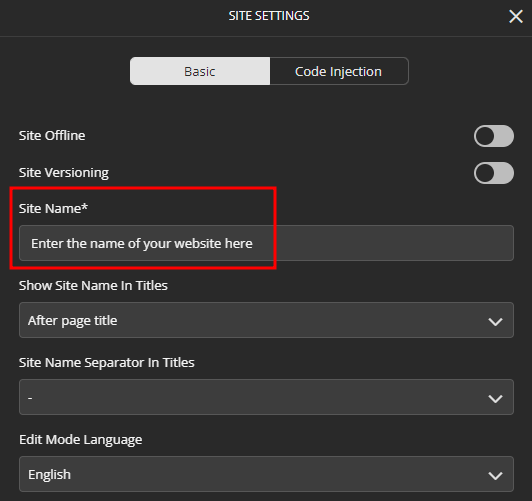
To change your website's name, displayed in the search engines such as Google search, follow the next steps:
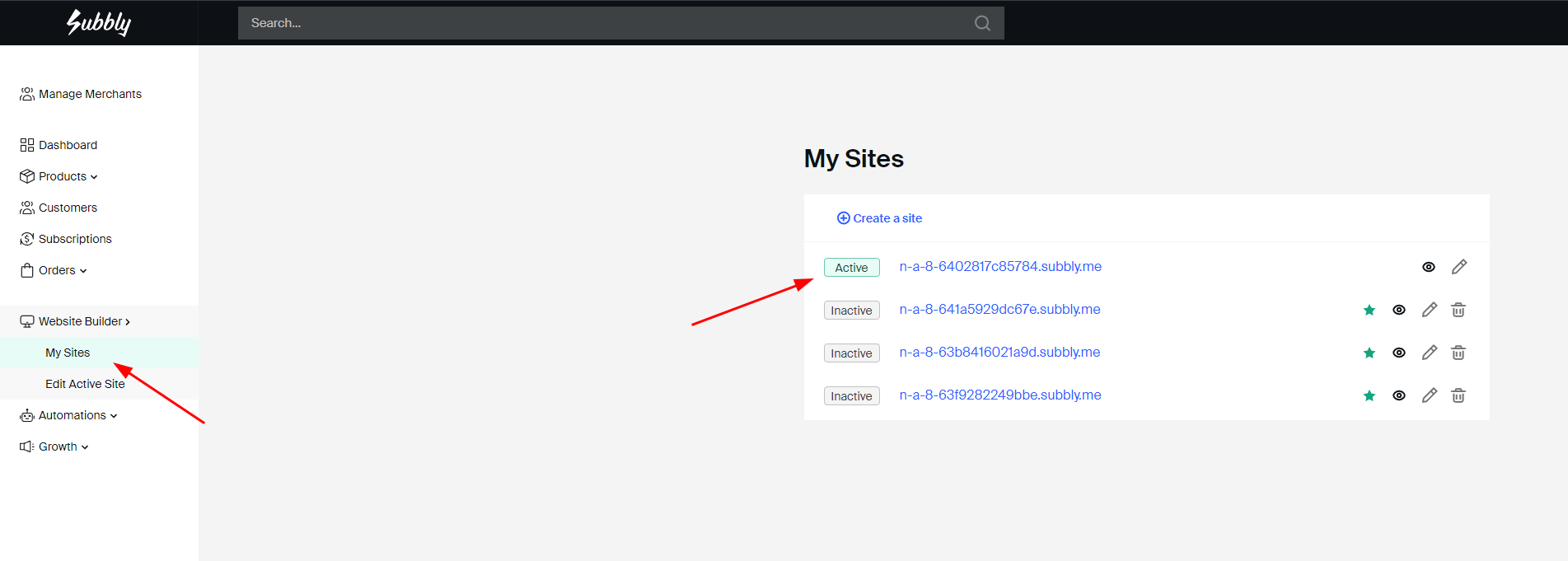
- Choose the site you're working on from here, in order to enter the Website Builder.
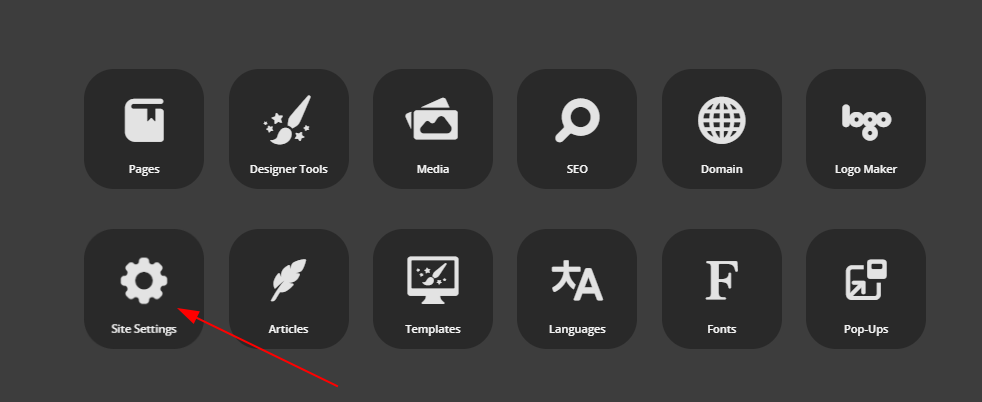
- Access your Dashboard and then access Site Settings.
- Change the Site Name.
How to change the names of each one of your pages?
To change the names of the pages that are displayed in the tabs of a browser, follow the next steps:
- Access your Dashboard and then access the SEO app.

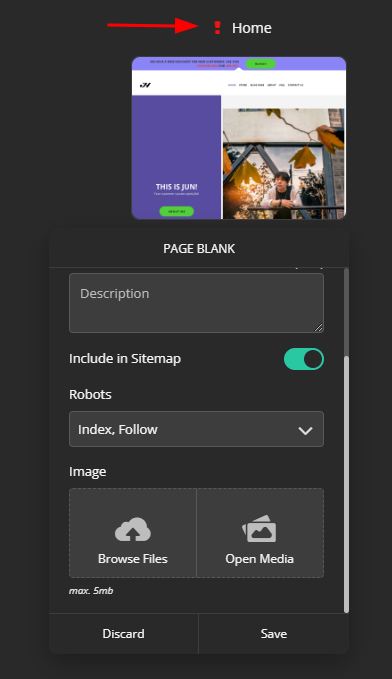
- Hover over the page for which you'd want to change the name, click on the little gear named Edit, and now you can change the Page Title and the description.
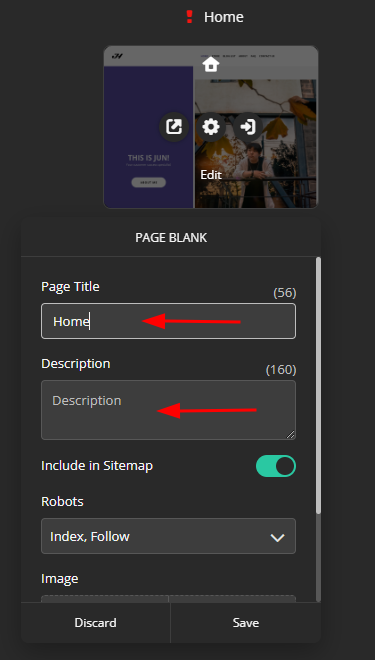
- The red exclamation mark will still appear until you add an image to the actual page. Please, be advised that this image will be displayed externally when people search your page on search engines.