Create a blog
Learn how to create and maintain blog on your site

Updated
by Andrija Krstic
This article contains instructions on how to build and maintain the blog on the Subbly's AI website builder.
Overview
We suggest using Contentful for setting up a blog on your site. Using an external CMS will help you easily maintain your blog section even without having to have access to the builder.
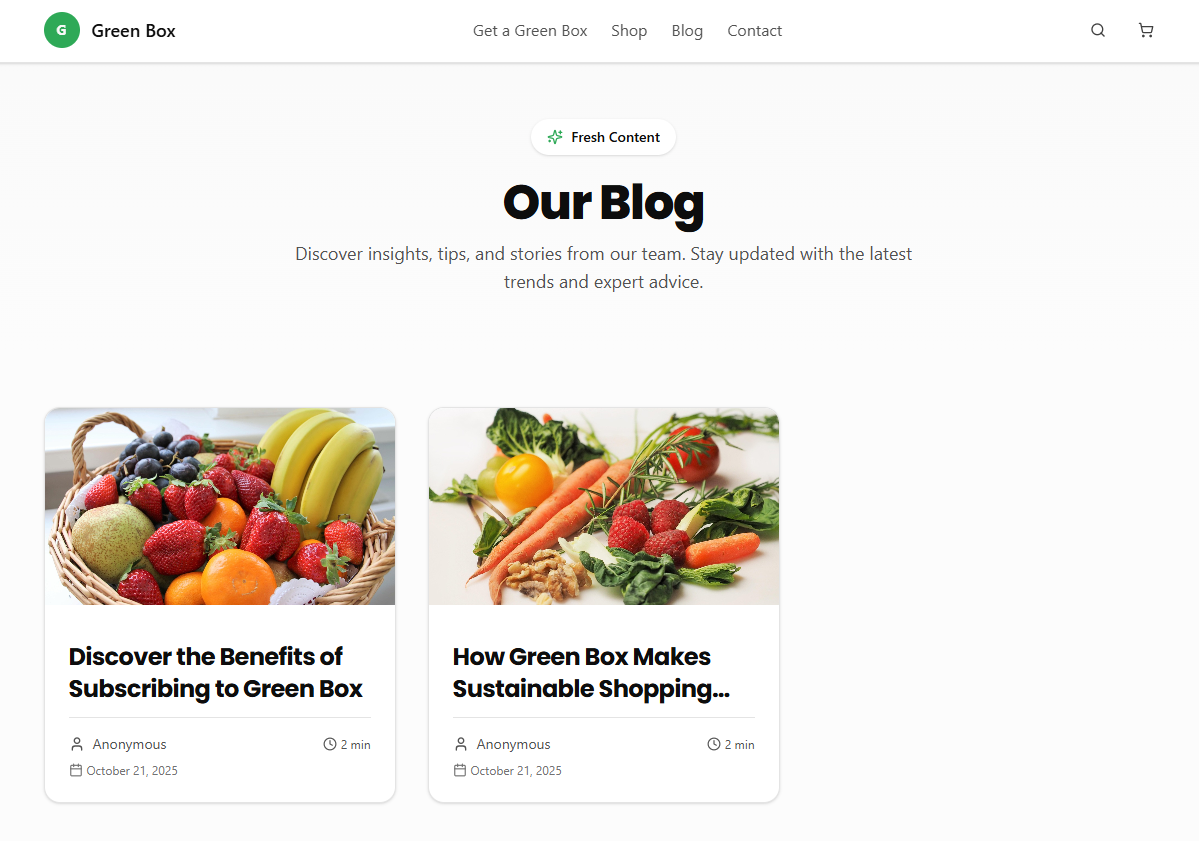
You'll be able to create blog that looks similar to the one below.
Video & Prompt Instructions
Note: When creating a blog via Contentful, the following fields should be added to the pageBlogPost content type. Required fields:
titleslugcontentpublishedDate
Optional fields:
shortDescriptionfeaturedImageauthortagsseoFields
Prompts used in the video are copied below.
# Comprehensive Guide: Implementing a Contentful Blog

This guide provides a complete implementation of a dynamic blog system using Contentful CMS and Next.js 15 with TypeScript, focusing on simplicity, performance, and user experience.

## 1. Package Installation

Install three packages using pnpm or npm (depends on project requirments): contentful, @contentful/rich-text-react-renderer, and @contentful/rich-text-types.

## 2. Environment Configuration

Add two environment variables to example.env file: CONTENTFUL_SPACE_ID and CONTENTFUL_ACCESS_TOKEN (use Content Delivery API token, not Preview API).

**Important**: Use the Content Delivery API token (not Preview API) for production reliability.

## 3. Contentful Content Model Setup

**Required Content Type**: `pageBlogPost`

Create a content type with the following fields:

### Required Fields:
- `title` (Short text) - Blog post title
- `slug` (Short text, unique) - URL slug for the post
- `content` (Rich text) - Main blog content
- `publishedDate` (Date & time) - Publication date for ordering

### Optional Fields:
- `shortDescription` (Long text) - Post excerpt/summary
- `featuredImage` (Media) - Hero image for the post
- `author` (Reference to Person content type) - Post author
- `tags` (Short text, list) - Post categories/tags
- `seoFields` (Reference to SEO component) - Meta title and description

### SEO Component Structure (if using):
- `pageTitle` (Short text) - Meta title
- `pageDescription` (Long text) - Meta description
## 4. Directory Structure

Create directory structure: src/lib/contentful/ (index.ts, api.ts), src/types/ (contentful.ts), src/components/shared/ (breadcrumbs.tsx, pagination.tsx, rich-text-renderer.tsx, error-message.tsx), src/components/blog/ (blog-post-card.tsx), src/app/blog/ (page.tsx, [slug]/page.tsx).

## 5. Implementation Details

### 5.1 Modern Contentful SDK Compatibility

**Critical**: Contentful SDK v11+ requires proper TypeScript skeleton types. Create three skeleton interfaces that extend `EntrySkeletonType`:

**BlogPostSkeleton** with contentTypeId 'pageBlogPost' containing fields: title (string), slug (string), content (Document from rich-text-types), publishedDate (string), plus optional shortDescription (string), featuredImage (Asset), author (Entry reference), tags (string array), seoFields (Entry reference).

**AuthorSkeleton** with contentTypeId 'author' containing: name (required string), optional bio (string), avatar (Asset), email (string), website (string).

**SeoFieldsSkeleton** with contentTypeId 'seoFields' containing optional pageTitle and pageDescription (both strings).

Export type aliases: BlogPostEntry, AuthorEntry, SeoFieldsEntry as Entry types with proper generics.

Import requirements: Asset, Entry, EntrySkeletonType from 'contentful' and Document from '@contentful/rich-text-types'.

### 5.2 Contentful Client Setup (`lib/contentful/index.ts`)

Create a Contentful client with environment variable validation. Import createClient from 'contentful'. Add validation that throws errors if CONTENTFUL_SPACE_ID or CONTENTFUL_ACCESS_TOKEN are missing. Export contentfulClient created with space, accessToken, and host set to 'cdn.contentful.com'. Re-export everything from './api'.

### 5.3 API Functions with Result Types (`lib/contentful/api.ts`)

Implement discriminated union pattern for error handling:

**ApiError interface** with message (string) and optional details (unknown).

**Result types** as discriminated unions: BlogPostsResult and BlogPostResult, each with success true/false branches. Success branch contains data object, failure branch contains error object.

**Helper function** createApiError that returns different messages for development vs production environments. Development shows actual error, production shows generic message.

**API functions** use try/catch pattern. Success returns object with success: true and data containing posts array plus pagination object (total, page, limit, totalPages, hasNextPage, hasPrevPage). Failure returns success: false with createApiError result.

**Functions to implement:** getBlogPosts (paginated), getBlogPostBySlug (single post), getRecentBlogPosts (recent posts). All use contentfulClient.getEntries with appropriate parameters and processBlogPost transformation.

**Benefits:**
- Type-safe error handling with discriminated unions
- Clean separation of success/error states
- Development vs production error messages
- Easy to extend and test

### 5.4 Component Architecture

**Shared Components:**

1. **Breadcrumbs** - Home > Blog structure with mobile-responsive truncation
2. **Pagination** - Previous/Next buttons with page numbers (desktop) and page indicators (mobile)
3. **Rich Text Renderer** - Custom rendering for all Contentful rich text elements
4. **Error Message** - User-friendly error display with accessibility focus

**Blog Components:**

1. **Blog Post Card** - Featured image, title, excerpt, metadata, and author information
2. **Blog Post Grid** - Responsive grid container with empty state handling

### 5.5 Page Implementation

**Blog Listing (`app/blog/page.tsx`):**
- Server-side pagination handling
- SEO-optimized metadata
- Error state handling with skeleton UI
- Breadcrumb integration

**Blog Post Detail (`app/blog/[slug]/page.tsx`):**
- Dynamic metadata generation from post content
- Featured image display and rich text content rendering
- Author bio section and back navigation
- Proper SEO implementation with Open Graph tags

## 6. Rich Text Renderer Edge Cases

Handle these specific scenarios in your rich text component:

**Asset URL Processing:** Check if URL starts with '//' and prepend 'https:' if needed for protocol-relative URLs.

**Image Details Type Safety:** Cast file.details to object type with optional image property containing optional width and height numbers to safely access image dimensions.

**Entry Link References:** In INLINES.ENTRY_HYPERLINK handler, extract entry from node.data.target. If entry has fields.slug, render Link component with href '/blog/[slug]', otherwise render span element.

## 7. Exact Contentful Image Domains

Update next.config.ts images.remotePatterns array to include two Contentful domains: 'images.ctfassets.net' and 'downloads.ctfassets.net'. Both should use https protocol and '**' pathname pattern.

## 8. What NOT to Include

Based on best practices for maintainable blog implementations:

### 8.1 Static Site Generation
- Avoid pre-building all blog post pages at build time
- Skip slug collection functions for static generation
- Use dynamic rendering for always-fresh content

### 8.2 Complex Filtering Systems
- No category-based filtering components
- No tag-based navigation pages
- Skip functions that filter posts by metadata fields (tags, categories, authors)
- Keep navigation simple with breadcrumbs and pagination only

### 8.3 Reading Time Calculations
- No automatic reading time estimation
- Focus on content quality over reading metrics

### 8.4 Preview Content Types
- No separate preview/summary content types
- Use the full blog post type for all displays

## 9. SEO and Performance Optimization

### 9.1 Meta Tag Strategy
- Dynamic title and description generation
- Open Graph image from featured image
- Twitter Card optimization
- Canonical URL management

### 9.2 Image Optimization
- Use Next.js Image component for all images
- Implement responsive images with proper sizing
- Include alt text from Contentful or fallbacks
- Lazy loading for performance

### 9.3 Core Web Vitals
- Optimize Largest Contentful Paint with image optimization
- Minimize Cumulative Layout Shift with proper image dimensions
- Fast server-side rendering for First Input Delay
## 10. Comprehensive Error Handling Strategy

### 10.1 All API Failure Scenarios
Handle all possible API failures gracefully: network issues, invalid data, missing configuration, service outages, and content errors. Use try/catch blocks and return consistent error objects for all failure scenarios.

### 10.2 Error Response Patterns

In components, check result.success boolean. If false, render ErrorMessage component with result.error.message and conditional showDetails for development. If true, destructure posts and pagination from result.data and render BlogPostGrid and Pagination components. TypeScript will enforce this pattern and provide proper type safety.

### 10.3 Content Not Found Handling
- Use Next.js `notFound()` for missing blog posts
- Provide helpful navigation back to blog listing
- Maintain SEO-friendly 404 responses

### 10.4 Loading States and Fallbacks
- Implement skeleton loaders for all loading states
- Provide meaningful error messages for each failure type
- Maintain page functionality even when content fails to load

## 11. Content Management Best Practices

### 11.1 Required Fields Configuration
- Always require title, slug, and content fields
- Make publication date mandatory for proper ordering
- Validate slug uniqueness in Contentful

### 11.2 Optional Enhancements
- Rich author profiles with bio and social links
- SEO field customization per post
- Tag system for loose content organization
- Featured image recommendations (aspect ratio guidelines)

This implementation provides a robust, maintainable blog system that prioritizes user experience, SEO performance, and developer productivity while maintaining simplicity and reliability.
Be sure to include header on blog and blog/:slug pages, and also better style blog page to follow design/style patterns from home page and be more modern
Provided prompts are intended as guidance only and should be adapted and refined for the specific use case before being used in a project. Given the indeterministic nature of AI systems, the same prompt may also produce slightly different results across environments or executions.
How did we do?
Optimizing site's SEO