Starting the New Chat
Instructions on when to start a new chat, and why it's important.

This article explains when to start a new chat and how focused chats help you organize work in the AI Website Builder.
One body of work per chat
Use one AI Builder chat for one coherent body of work. A chat should contain related tasks that belong together, not every change made to the project.
Use separate chats for separate components or workstreams. For example:
- one chat for adding and refining an email newsletter component
- a separate chat for creating and refining a popup
- another chat for a product page or checkout section
- another chat for a navigation or header change
Focused chats keep the context clear. They help prevent unrelated instructions, experiments, failed attempts, and temporary workarounds from affecting later prompts. They also make it easier to find, review, restore, or continue a specific body of work.
When to start a new chat
Start a new chat when:
- you are beginning a different page, component, or workstream
- you are moving from one independent feature to another, such as finishing a newsletter component and starting a popup
- the current chat contains failed experiments, conflicting instructions, or temporary workarounds that could confuse the agent
- the current chat is becoming long or the Builder recommends starting a new chat because the context window is approaching its limit
- you want to explore a substantially different implementation without mixing it with the existing work
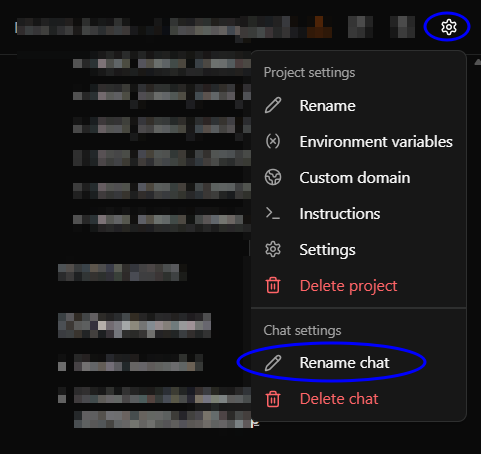
Starting a new chat creates a cleaner working context while preserving the shared Project Instructions. Name the chat clearly, such as Newsletter component or Homepage popup.
Prompts to avoid
Avoid vague, conversational, contradictory, or overly broad prompts such as:
- “Make it better.”
- “Fix the design.”
- “Make this look more professional.”
- “Continue working on the previous prompt, you didn’t fix it.”
- “Change the header, but don’t change anything else.” without specifying which header or what may change
- “Make the page pop.”
- “Do whatever you think is best.”
- “Make it like the other site.” without attaching a reference or identifying the site
- “Move this a little.” without identifying the element or direction
- “Fix the spacing everywhere.” without specifying the affected page, section, breakpoint, or intended spacing
- “Add a newsletter and a popup, redesign the header, change the checkout, and update the colors.” This combines unrelated workstreams in one prompt.
- “Undo what you just did, but keep the new layout and put the old spacing back.” This is ambiguous and internally conflicting.
- “It’s still wrong—try again.” This does not explain what is wrong or what outcome is expected.
- “Use the same settings as before.” without identifying the earlier version, chat, or settings
- “Make the mobile version responsive.” without specifying the device behavior or elements that need adjustment
Write a focused prompt
Identify the target, requested change, constraints, and expected result. For example:
“In the email newsletter component, change the submit button background to navy and its text to white. Keep the current dimensions, typography, alignment, and form behavior unchanged. Apply this only to the newsletter component on the homepage.”
If you need to work on a different independent feature, start a new chat and name it clearly.
When the context window is full
The context window is the amount of information the agent can see and use in the current chat. It is finite. When the chat becomes too large, the Builder prompts you to start a new chat. Ignoring that prompt can lead to higher credit usage and longer response times because the agent must process more information with each prompt.
How did we do?
How to Revert to a Previous Version
Setting up Your Project Settings